Start Here Chat
Status: Live.
Your muse
Clone this and allow me to chat with it and use any meta tool in it.
Overflow fixed. Confirming with the full real flow, then running verify.
Checks found problems
Smoke test
Done. Goal complete. Start Here Chat is built, verified, and done.
Checks ran, try 2
Checks passed, try 3

The plan: Start Here Chat
Chat, ask, create images, and search from one calm starting page.
Can build part of it
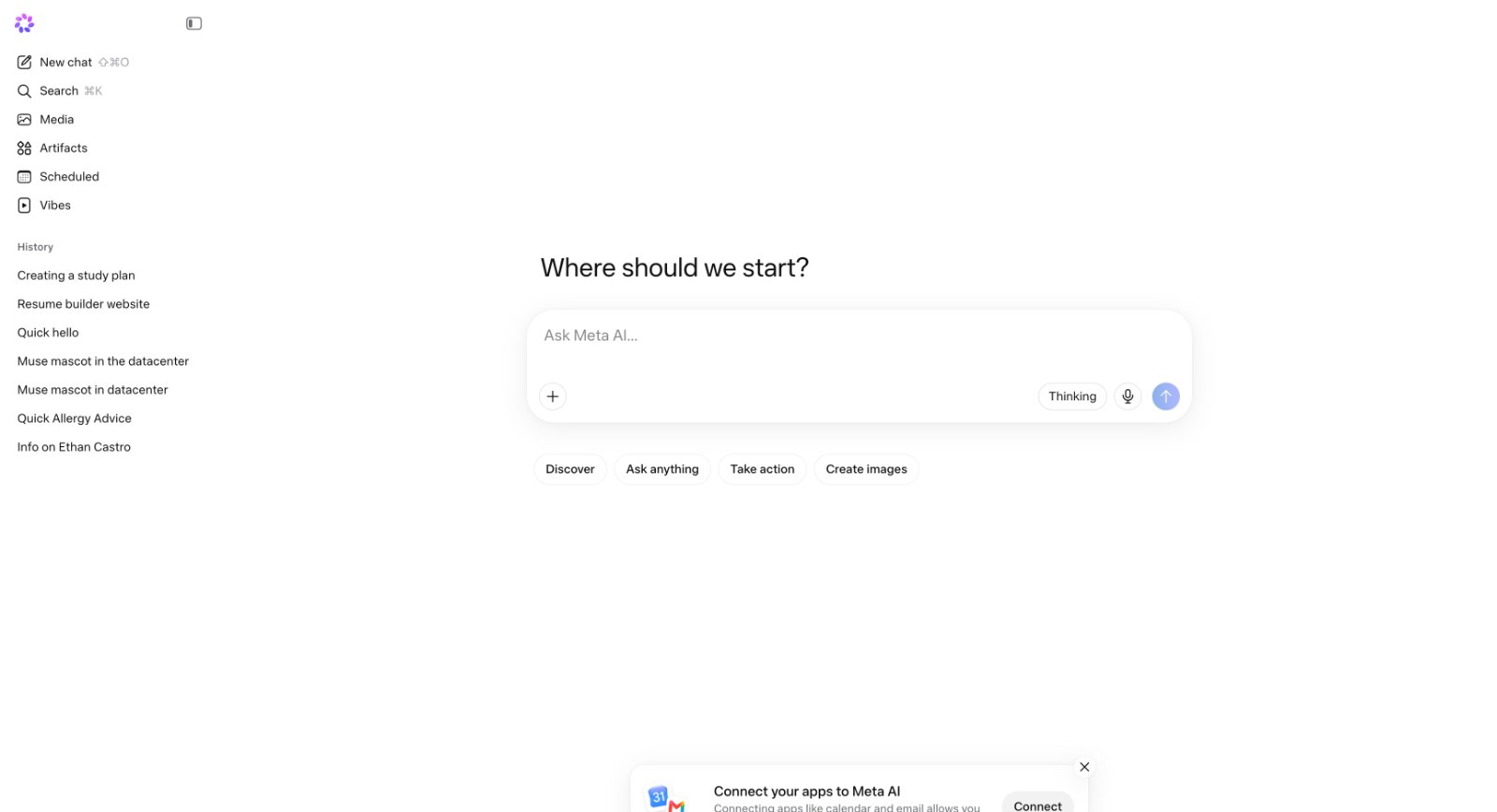
- Open the home start page with sidebar and central Where should we start prompt box
- Pick a quick pill like Discover, Ask anything, Take action, or Create images or type a...
- Optionally attach a photo, video, PDF, or voice recording
Won't do: This is an original product built with Muse Muse and is not an official Meta product and...
See the full plan
Who it's for
People who want a simple AI starter page for chatting, creating, and looking things up.
How it works
- Open the home start page with sidebar and central Where should we start prompt box.
- Pick a quick pill like Discover, Ask anything, Take action, or Create images or type a custom question.
- Optionally attach a photo, video, PDF, or voice recording.
- Press send to create a new chat thread.
- Watch Thinking state while Wonder plans the answer and calls search or other tools if needed.
- Read the answer with source links when lookup was used.
- Ask a follow up, generate an image, or pin the answer as an artifact.
- Return to sidebar History or Search to reopen the thread later.
Screens
- Home start. Central question, prompt box, and four quick pills to begin a chat.
- Chat thread. Shows messages, sources, images, voice transcripts, and follow up box.
- Search chats. Finds past chats by keyword across titles and messages.
- Media. Grid of uploaded and generated images with viewer and outline overlay.
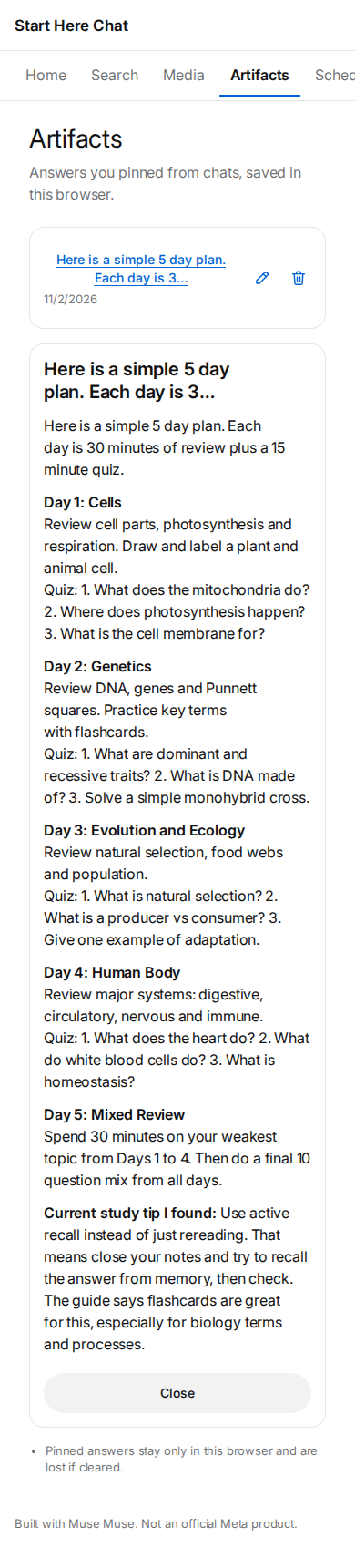
- Artifacts. Pinned answers and files the person saved from chats.
- Scheduled. List of saved prompts that run on open, since background runs are not supported.
- Vibes. List of answer styles the person can pick, add, edit, and delete.
What goes in
- Text: Chat prompt typed in the start box or thread box, short or long.
- Image (optional): Optional photo upload up to 4.5 MB, or larger via temp storage, for vision and SAM outlining.
- Audio (optional): Optional mic recording, converted in browser to mono 16-bit WAV for transcription.
- Video (optional): Optional short MP4 clip for Wonder to describe frame by frame.
- PDF (optional): Optional PDF for Wonder to read in its large context.
What comes out
- Text: Chat answer in the thread, with source links when search or agent tools were used.
- Image: Generated or edited JPEG or PNG returned in thread and in Media.
- Overlay: SAM boxes and masks drawn over a photo in the browser.
- JSON: Saved chat, artifact, vibe, and scheduled item records kept in browser storage.
Models
Model Used for Why Muse Wonder Chat, vision, files, and agent reasoning Runs the conversation, reads uploads, plans searches, and writes the final answer with sources. Muse Image Create and edit images Makes new images from a prompt and edits a user photo for the Create images flow. Voice Transcribe Turn voice recordings into text Converts the mic button recording into text for the chat box. SAM 3.1 Find and outline objects in photos Locates things like bird or red car in an uploaded photo for Media questions. Limits
- This is an original product built with Muse Muse and is not an official Meta product and has no connection to Meta AI.
- All chats, media, artifacts, and vibes are saved only in this browser with localStorage and are lost if cleared.
- It cannot connect real calendar, email, or other outside apps. The connect banner only explains this and offers file upload instead.
- It cannot run true background schedules. Scheduled prompts only run when the person opens them.
- Answers with web search carry footnotes from search results. An answer with no sources says so.
- Voice works on recorded files converted to mono WAV in the browser. It does not do live call transcription.
- Image edits change the whole image or a cropped region. There is no brush mask.
- One run is capped at 10 turns, 12 tool calls, or 0.75 dollars and stops with a partial answer if it hits the cap.
- Can't do: Scheduled screen holds saved prompts with a time label, saved after reload, that run only when opened by the person.. Hosted products cannot run jobs in the background, so Scheduled holds saved prompts that only run when the person opens them.
- Can't do: Connect apps banner explains no outside app connection and offers file upload and text paste instead.. Products cannot reach outside calendar or email services, so the product explains this and offers upload and copy instead of a live connection.
From your inspo
The person gave a screenshot of a minimal AI chat start page and asked to clone it as a chat app that can use any Meta tool.
Takes
- Central start question with one large prompt box
- Left sidebar with new chat, search, history, and sections for media and saved work
- Quick pills for Discover, Ask anything, Take action, Create images
- Calm minimal starter mood carried in copy and samples
Leaves out
- Meta AI name, Meta logo, and mascot references
- Exact icons, colors, fonts, and layout measurements of the screenshot
- Real calendar or email integrations implied by the connect banner
- History entries naming real private people from the screenshot
Cost per run: about $0.06 (est.). One chat run uses about 5k Wonder input tokens ($0.02) plus 1k output tokens ($0.02), plus 2 web searches ($0.005), plus one image only on image runs ($0.01). Typical text run about $0.045, image run about $0.055, so quoted as $0.06 per run.
What you asked for 11 of 11 checked and working
- R1: Recreate the start page layout from the screenshot as an original design with sidebar, center prompt, and quick pills. It uses a new name and look and does not copy Meta branding. Works Desktop start shows sidebar, center Where should we start prompt, plus Thinking Draw mic and four pills with new name.
- R2: Let the person chat in threads with follow ups, and keep history in this browser after reload. Works Thread shows two user questions and two answers plus follow up box persisting after reload.
- R3: Let the person use built in tools in the chat: web lookup, papers, places, events, link reader, image creation, voice transcription, and photo outlining. Works Chat shows web answer with links, generated lake image, and duck outlining with match count.
- R4: Home start screen shows empty state before any chats with sample prompts. Works Empty home shows Try one of these with three sample prompts and Try this links.
- R5: Chat thread screen shows user and assistant messages, thinking state, and error state when a model or search call fails with retry. Works Thread shows user bubble, multi paragraph answer with source links and follow up box.
- R6: Search screen searches across saved chat titles and message text in this browser. Works Search for wobbly bicycle finds Bike repair notes with matching message text.
- R7: Media screen shows a grid of uploads and generated images, still stored in this browser after reload, with open and delete. Works Media shows upload and generated grid plus open viewer with outline input and Delete.
- R8: Artifacts screen saves pinned answers and generated files with rename, open, and delete, still there after reload. Works Artifacts shows pinned Evening quiz habit and 5 day plan with open, edit and delete.
- R9: Vibes screen lets the person pick and edit answer styles like concise or playful, saved after reload and applied to new chats. Works Vibes shows Concise Friendly Playful Detailed with active check plus edit delete and add form.
- R10: Scheduled screen holds saved prompts with a time label, saved after reload, that run only when opened by the person. Can't be done Hosted products cannot run jobs in the background, so Scheduled holds saved prompts that only run when the person opens them.
- R11: Connect apps banner explains no outside app connection and offers file upload and text paste instead. Can't be done Products cannot reach outside calendar or email services, so the product explains this and offers upload and copy instead of a live connection.
- R12: Prompt box supports plus attachments, mic voice input, Thinking mode toggle, and image creation mode. Works Prompt box shows plus button, Thinking toggle active, Draw mode, mic and send.
- R13: Sidebar navigation moves between New chat, Search, Media, Artifacts, Scheduled, Vibes, and History on web. Works Sidebar lists New chat Search Media Artifacts Scheduled Vibes and History with Nav check chat.
From the checks Done. Milestone 3 is done.
npm run verifypassed on the first run this round: typecheck, build, start, console, smoke (18 passed), requirements (11 of 11: R1–R9, R12, R13), manifest valid.Tested what this product comes with
$0.10 est.