Start Here Chat
LiveChat, ask, create images, and search from one calm starting page.
musemuse-start-here-chat.vercel.appOpen (opens in a new tab)
Get it
Connect it to any app that speaks MCP. It has 5 tools: send_chat, create_image, transcribe_voice, find_object, read_saved_page. No sign-in.
- Muse app: add this URL as a custom connector.
- Claude Code:
claude mcp add --transport http start-here-chat https://muse-muse.vercel.app/api/mcp/start-here-chat - Anything else: add it as a remote server over streamable HTTP.
TestedMCP server: listed 5 tools, called send_chat and read_saved_pageNov 2
create_image, transcribe_voice and find_object failed when called.
- Passed: Connect to the MCP server
- Passed: List its tools: 5 found
- Passed: Call send_chat
- Failed: Call create_image
- Failed: Call transcribe_voice
- Failed: Call find_object
- Passed: Call read_saved_page
MCP server. A real run on Nov 2, replayed from its log. Long waits are shortened.
What you asked for 11 of 11 checked and working
- R1: Recreate the start page layout from the screenshot as an original design with sidebar, center prompt, and quick pills. It uses a new name and look and does not copy Meta branding. Works Desktop start shows sidebar, center Where should we start prompt, plus Thinking Draw mic and four pills with new name.
- R2: Let the person chat in threads with follow ups, and keep history in this browser after reload. Works Thread shows two user questions and two answers plus follow up box persisting after reload.
- R3: Let the person use built in tools in the chat: web lookup, papers, places, events, link reader, image creation, voice transcription, and photo outlining. Works Chat shows web answer with links, generated lake image, and duck outlining with match count.
- R4: Home start screen shows empty state before any chats with sample prompts. Works Empty home shows Try one of these with three sample prompts and Try this links.
- R5: Chat thread screen shows user and assistant messages, thinking state, and error state when a model or search call fails with retry. Works Thread shows user bubble, multi paragraph answer with source links and follow up box.
- R6: Search screen searches across saved chat titles and message text in this browser. Works Search for wobbly bicycle finds Bike repair notes with matching message text.
- R7: Media screen shows a grid of uploads and generated images, still stored in this browser after reload, with open and delete. Works Media shows upload and generated grid plus open viewer with outline input and Delete.
- R8: Artifacts screen saves pinned answers and generated files with rename, open, and delete, still there after reload. Works Artifacts shows pinned Evening quiz habit and 5 day plan with open, edit and delete.
- R9: Vibes screen lets the person pick and edit answer styles like concise or playful, saved after reload and applied to new chats. Works Vibes shows Concise Friendly Playful Detailed with active check plus edit delete and add form.
- R10: Scheduled screen holds saved prompts with a time label, saved after reload, that run only when opened by the person. Can't be done Hosted products cannot run jobs in the background, so Scheduled holds saved prompts that only run when the person opens them.
- R11: Connect apps banner explains no outside app connection and offers file upload and text paste instead. Can't be done Products cannot reach outside calendar or email services, so the product explains this and offers upload and copy instead of a live connection.
- R12: Prompt box supports plus attachments, mic voice input, Thinking mode toggle, and image creation mode. Works Prompt box shows plus button, Thinking toggle active, Draw mode, mic and send.
- R13: Sidebar navigation moves between New chat, Search, Media, Artifacts, Scheduled, Vibes, and History on web. Works Sidebar lists New chat Search Media Artifacts Scheduled Vibes and History with Nav check chat.
What was checked
Checked by code
Each line is what the check ran on, and no more.
- Passed Typecheck · Nov 2, 2026
- Passed Build · Nov 2, 2026
- Passed The built app starts · Nov 2, 2026
- Passed No errors in the browser console · Nov 2, 2026
- Passed Smoke test of the main flow · Nov 2, 2026
- Passed requirements · Nov 2, 2026
- Passed Its manifest is valid · Nov 2, 2026
- Passed MCP server: listed 5 tools, called send_chat and read_saved_page · Nov 2, 2026
- Passed CLI: ran send_chat and printed JSON · Nov 2, 2026
- Passed Claude plugin: its manifest and MCP address check out · Nov 2, 2026
- Passed Muse gadget commands: 5 commands check out, and send_chat ran and printed JSON · Nov 2, 2026
- Passed Skill file: Muse Code used it to run send_chat · Nov 2, 2026
- Passed send_chat replied with an agent's full record · Nov 2, 2026
- Passed The run finished rather than stopping short · Nov 2, 2026
Judged by a model
This is a model's opinion, not proof.
- Passed A model's opinion of the screenshots, against the brief · Nov 2, 2026
Not checked
Nothing here should be taken as tested.
- Not checked Whether its answers are true
- Not checked Real sends on real accounts: builds use samples
- Not checked Installing the Claude plugin or the Muse gadget pack on a real device
- Not checked Agent reply: no claims to check · Nov 2, 2026
- Not checked ChatGPT: not tested here · Nov 2, 2026
The muse
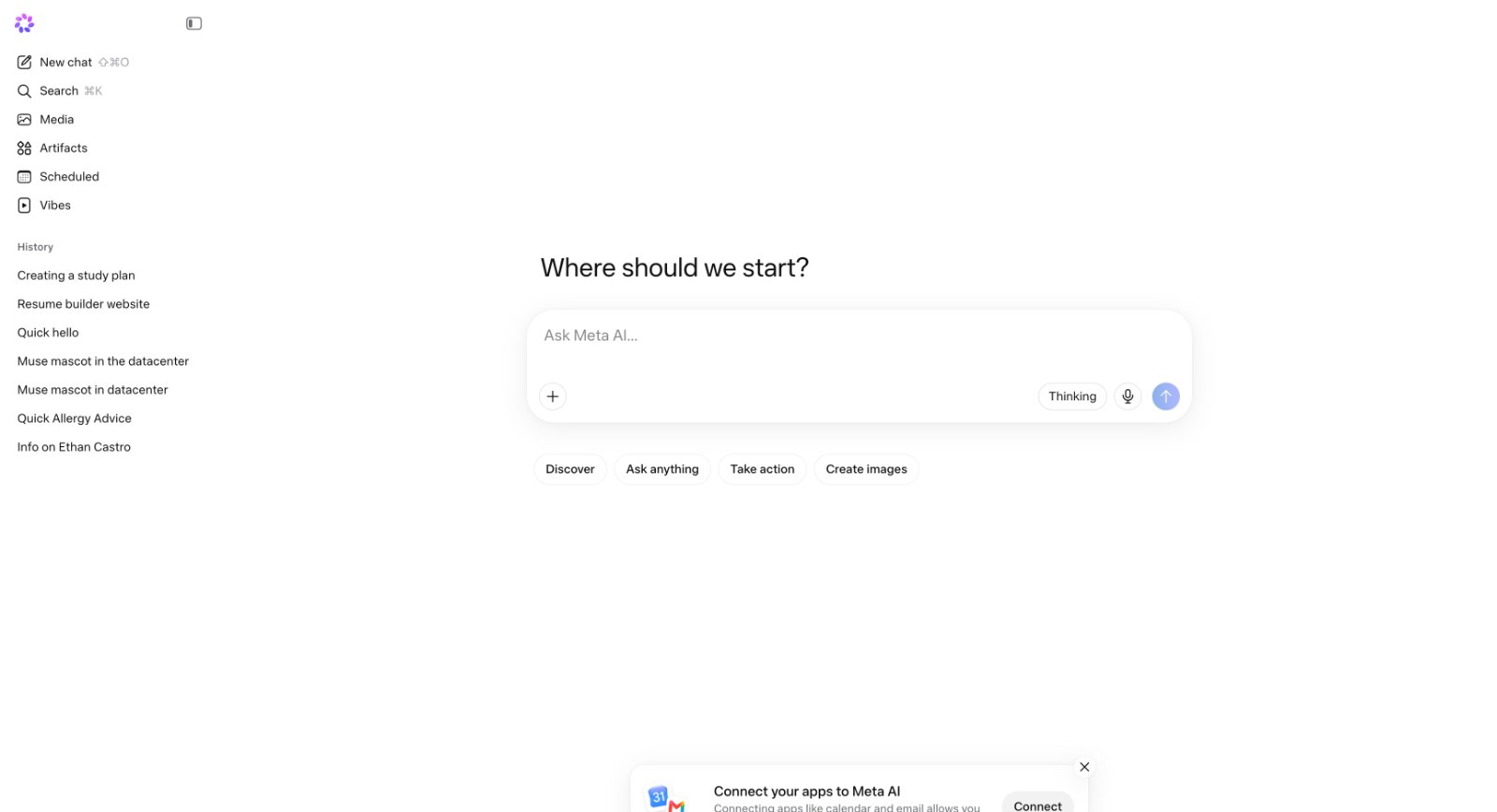
A minimal AI chat start page screenshot, rebuilt as an original calm starter with sidebar, prompt box, and quick pills
Took from it
- Central start question with one large prompt box
- Left sidebar with new chat, search, history, and sections for media and saved work
- Quick pills for Discover, Ask anything, Take action, Create images
- Calm minimal starter mood carried in copy and samples
Left out
- Meta AI name, Meta logo, and mascot references
- Exact icons, colors, fonts, and layout measurements of the screenshot
- Real calendar or email integrations implied by the connect banner
- History entries naming real private people from the screenshot